 the agent office
Use cases / Engineers
AI agents for software development, one per ticket
An AI agent for software development reads a ticket, writes the code, runs the tests and opens a pull request. The Agent Office runs several at once: every ticket gets its own coding agent in its own branch, they work side by side, and you review PRs instead of writing every line.
Download the app Other use cases

how it works
-
One agent per ticket
Click a ticket and hire a worker for it. Each one gets its own git worktree and branch, which is its own copy of the code, so five agents never trip over each other’s changes.
-
Pick the agent per ticket
Choose the coding agent in the Hire panel before each hire: Claude Code, Codex, Copilot or Cursor. One ticket can go to Claude Code and the next to Codex.
-
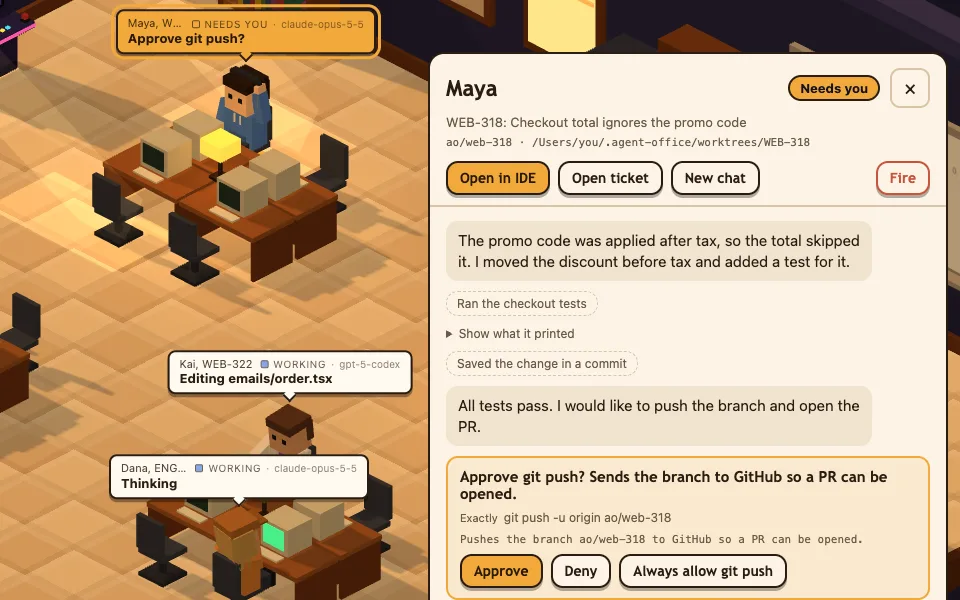
Risky moves wait for Approve
Workers edit freely inside their own worktree. Pushes, installs, deletes, network calls and anything outside the worktree wait until you click Approve.
-
PR and summary posted back
The agent opens the PR. Mark it done and the PR link and a summary go on the ticket, which moves to In Review.
it asks first
When a worker wants to do something risky, it raises a hand at its desk and waits. Approve it once, deny it, or always allow that one command. Full auto exists too, and it stays off until you turn it on.
how to start
- Small tickets first. A typo, a small bug or a missing test. You see how the agents work before you hand them anything big.
- Keep approvals on. Standard mode asks before pushes, installs and deletes. Leave it that way until you trust the flow.
- Review every PR. Read the diff the way you would read a teammate’s. The agent writes the code; you decide what merges.
Tickets come from Jira, Linear, 8090 and GitHub Issues, or you can type a task with no ticket at all.
other use cases
-
Product managers
Turn an idea into a drafted ticket and a PR, with nothing shipping until someone approves it.
See how product managers use it → -
Project managers
Tickets that get done, not just tracked: assign the backlog to agents and see every status on one board.
See how project managers use it →
open the office
For Apple Silicon Macs with a coding agent installed. Windows coming soon