 the agent office
What is agentic coding? (vs vibe coding)
Agentic coding is software development where an AI agent takes a task, reads the codebase, chooses steps, edits files and runs checks, using the results to decide what to do next. You set the goal and the boundaries; the agent carries out the implementation. Unlike autocomplete, it can work through several steps without a prompt for each one. In a well-run workflow, a person approves risky actions and reviews the change before it ships.
Say your CSV export drops the last row. With a chat assistant, you might paste a function, ask for a fix, copy the answer and run the test yourself. With a coding agent, you can hand over the bug: reproduce it, find the cause, fix it and show the evidence. You still own the decision to merge. You have delegated the investigation and typing.
That sounds close to vibe coding, because both involve telling AI what you want. The difference shows up when you ask, “How do we know this works?”
Agentic coding vs vibe coding
People use both terms loosely. Here, agentic coding describes an agent's ability to act through a task. Vibe coding describes a way of working where you steer by the result and pay little attention to the code underneath.
Simon Willison makes this distinction when discussing agentic engineering: coding agents can generate and execute code, while vibe coding, in its original sense, involves paying no attention to the code itself. We use that narrower meaning here. Asking AI to write code does not automatically make everything you do vibe coding.
| Question | Agentic coding with review | Vibe coding |
|---|---|---|
| What do you hand over? | A task with checks | An idea to explore |
| What does the AI do? | Reads, edits, runs, iterates | Generates changes you steer |
| How do you judge it? | Tests, behavior and the diff | Whether it seems to work |
| Who understands the change? | A human reviewer must | Understanding may be skipped |
| Useful starting point | A scoped repository task | A disposable prototype |
These are different dimensions, so the categories can overlap. You can use an agent to vibe code a weekend toy. You can also ask a chat assistant for one function and review every line carefully. The tool does not choose your standards.
Vibe coding can be a reasonable way to explore a throwaway idea. If you want to see whether a dancing potato makes your birthday invitation better, the potato does not need an architecture review. A billing change deserves a different standard. Keep the experiment quick, then raise the bar before anyone depends on it.
What makes a coding tool agentic?
The useful part is the loop: inspect the current state, take an action, observe what happened, then choose another action.
A coding agent might search for the export handler, read its tests, add a failing case, change the loop boundary and rerun the checks. A failure gives it new information. It can investigate that failure without waiting for you to paste the error back into a chat window.
This is a capability tools already provide. Anthropic's introduction to Claude Code describes searching and reading code, editing files, writing and running tests, and using command-line tools. That is the practical difference from a system that only returns suggested code.
Capability does not guarantee a good outcome. An agent can misunderstand a requirement, test the wrong behavior or confidently fix the symptom. “Agentic” tells you how it can work. You still need evidence that this particular change is right.
For a guide to the available options, see our best AI coding tools in 2026. Picking the tool is one decision. Setting up the work around it is another.
A concrete workflow: fix the missing export row
Here is an illustrative ticket for an existing app:
CSV exports omit the final record. Reproduce with three records, fix the export and add regression coverage. Check empty and single-record exports too. Keep the CSV columns and ordering unchanged. Do not add dependencies or change the database schema. Open a pull request with the checks you ran.
That is enough detail to expose a wrong approach early. The agent knows what success looks like and which shortcuts are out of bounds.
First, inspect and plan. The agent reads the export code and repository instructions, then proposes a small change. You can catch an unnecessary rewrite while it is still a paragraph. “Replace the export library” would need a better explanation than “the loop stops one record early.”
Next, reproduce the failure. The new three-record test should fail on the existing code. Otherwise, a passing test might only prove that the agent wrote an agreeable test. Ask it to explain what failed and why.
Then, implement and verify. The agent makes the focused fix, runs the relevant tests and checks empty and single-record cases. If it discovers unrelated failures, it reports them separately. Turning a one-line bug into an unrequested cleanup makes review harder.
Finally, review the pull request. Read the change and the regression test. Confirm the test checks all three records, including the last one. Try the export yourself if the surrounding behavior matters. Merge when the evidence holds up, rather than when the agent sounds pleased.
This example is deliberately ordinary. You learn more from one completed backlog bug than from asking an agent to rebuild the company before lunch.
What a good agentic workflow needs
The export example depends on four pieces of structure. You can put them together yourself; none requires a particular app.
Clear tickets with a finish line
Give the agent a reproducible problem, constraints and observable success criteria. Include where to look if you know it, but leave room for it to discover the cause.
“Improve exports” asks the agent to invent the job. “Export all selected records without changing the columns” gives it something you can judge. Small tickets also make a failed attempt cheaper to discard.
One isolated workspace per task
Each task should have its own working folder and branch. That lets the agent edit and test without mixing its changes with another task or your unfinished work.
A Git worktree provides a separate working tree backed by the same repository. Give each worker a different branch. This separates edits; it does not prevent merge conflicts when two branches later change the same code. It also is not a security sandbox: permissions still determine what processes can access.
Human approval for risky actions
Decide in advance which actions need a human decision. Package installs, deleting data, sending code elsewhere and deploying changes deserve explicit boundaries. Reading files and running an established local check usually need less interruption.
Keep approval requests specific: what action, why it is needed and what it affects. A vague “continue?” button is a poor substitute for understanding the decision. Check your agent's permission settings before you leave it working.
Review before merge
Ask for a pull request containing the change, a short explanation and the checks performed. Read the diff as you would a teammate's. Look for unrelated edits, missing edge cases and tests that merely repeat the implementation.
Review capacity limits useful parallelism. Six agents producing six unread pull requests have given you a queue. Start with one task and add more when you can still review the results properly.
How The Agent Office puts those pieces together
The Agent Office gives that workflow a place to live on your Mac. You bring a coding agent; the office helps you assign and follow its work.
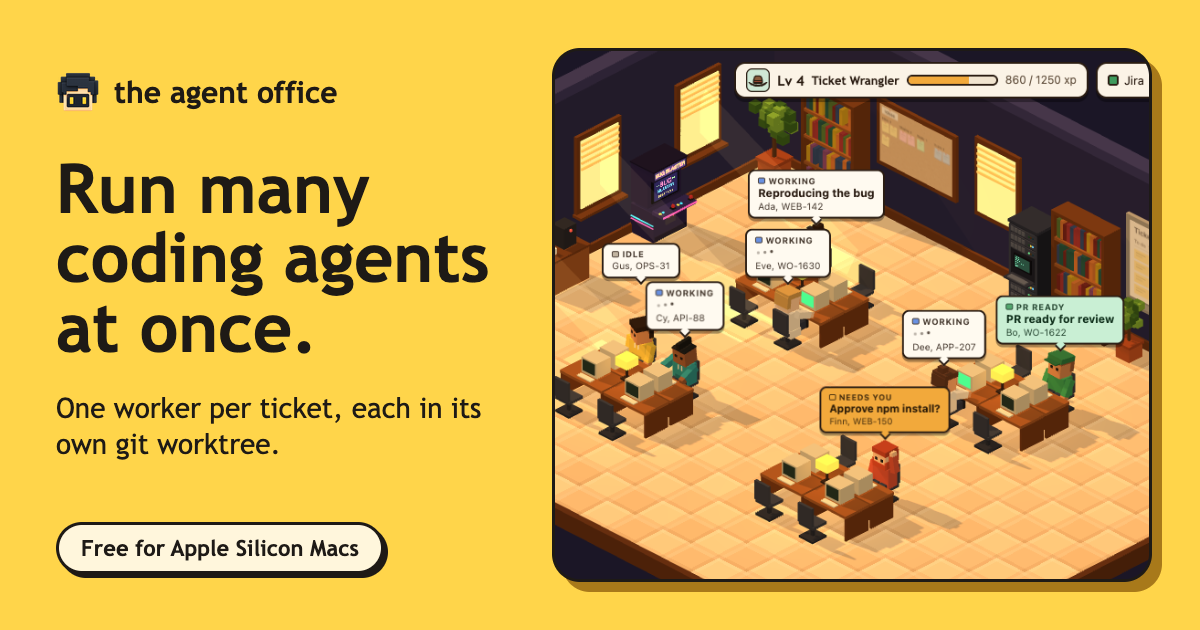
The ticket board holds the assignment. Connect a tracker or type a task, then hire a worker for it. The ticket keeps the goal visible while the worker investigates. You can see which task belongs to which worker without decoding terminal tabs named “node.”
Each worker gets a Git worktree and branch. The office creates the separate workspace for the task. Your export fix and another worker's settings change can proceed in their own folders. You still review how those branches fit together before merging.
Workers raise their hands when they need you. Questions and approval requests become visible in the office. Keep approvals enabled for actions you want to control; the raised hand brings you back to the decision. It saves you checking every terminal to discover who has been waiting since coffee.
The pull request comes back to the ticket. The worker posts the PR and a summary where the work began. You can compare the result with the original request and decide whether it is ready. Opening a PR is the handoff to review, not permission to skip it.
The wider discipline of choosing tasks, supervising agents and reviewing their output is what we call agentic engineering. Agentic coding is the implementation loop inside that work.
Try it on one real ticket
Pick a small bug you understand well enough to review. Write the expected behavior, name the boundaries and give one worker the task. Ask for a reproduction, a focused fix and a pull request with evidence. That first completed loop will tell you where your instructions and checks need work.
To try The Agent Office, download it below on an Apple Silicon Mac with a coding agent installed. Then put that first ticket on the board.