 the agent office
Put a Claude Code agent on every Linear issue
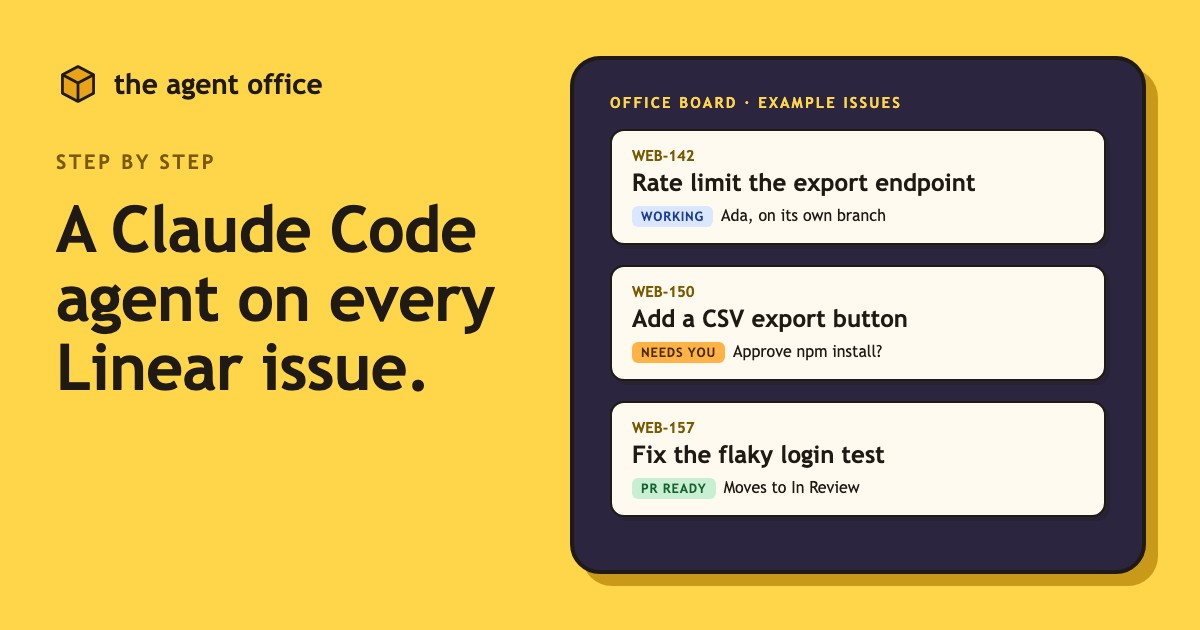
Most of a developer's day is not hard problems. It is the queue: the bug with a clear repro, the endpoint that needs a rate limit, the export button somebody asked for. Each one is small, and each one still costs a context switch.
The Agent Office puts a coding agent on each of those tickets, so you spend your time deciding instead of typing.
How it works
Connect Linear once and your assigned issues show up on the office board. Click an issue and hire a worker for it. The worker gets its own git worktree and branch, so two agents never trip over each other, and the issue moves to In Progress.
The agent writes a plan first. Pushes, installs and deletes wait for your OK, so nothing lands without you.
When you mark the work done, the PR and a summary are posted back on the issue, and it moves to In Review.
Set it up
- Download the app (the link is below) and drag it to Applications.
- Open Settings, pick Linear under Tickets from, and click Connect Linear. Linear's consent page opens once; there is no API key to paste.
- Optional: choose which teams reach the board and map each team to the repo it works in.
- Click an issue, then Hire.
What it does not do
It does not change your issues on its own. An issue moves to In Progress when you start work and to In Review when you mark it done, and anything else an agent wants to do to a ticket asks first.
Any coding agent works. Claude Code, Codex, Copilot and Cursor are examples, and each uses the sign-in it already has.